Coverage on every audit.
Pages checked out of pages planned, and which areas weren’t measured. “Speed not measured: PageSpeed is off” is part of the result.
Website audit app for Mac
Damdit loads the sites you build in a real browser, checks up to 500 pages and backs every issue with evidence. When a page times out or a check can’t run, you see that too. Never a quiet pass.
Rendered in ChromiumYour JavaScript runs before anything is checked.
No quiet passesA page it couldn’t check is listed as not checked.
Evidence on every issueThe pages, the element, what was found.
Stays on your MacAudits never go to a Damdit server.
Coverage
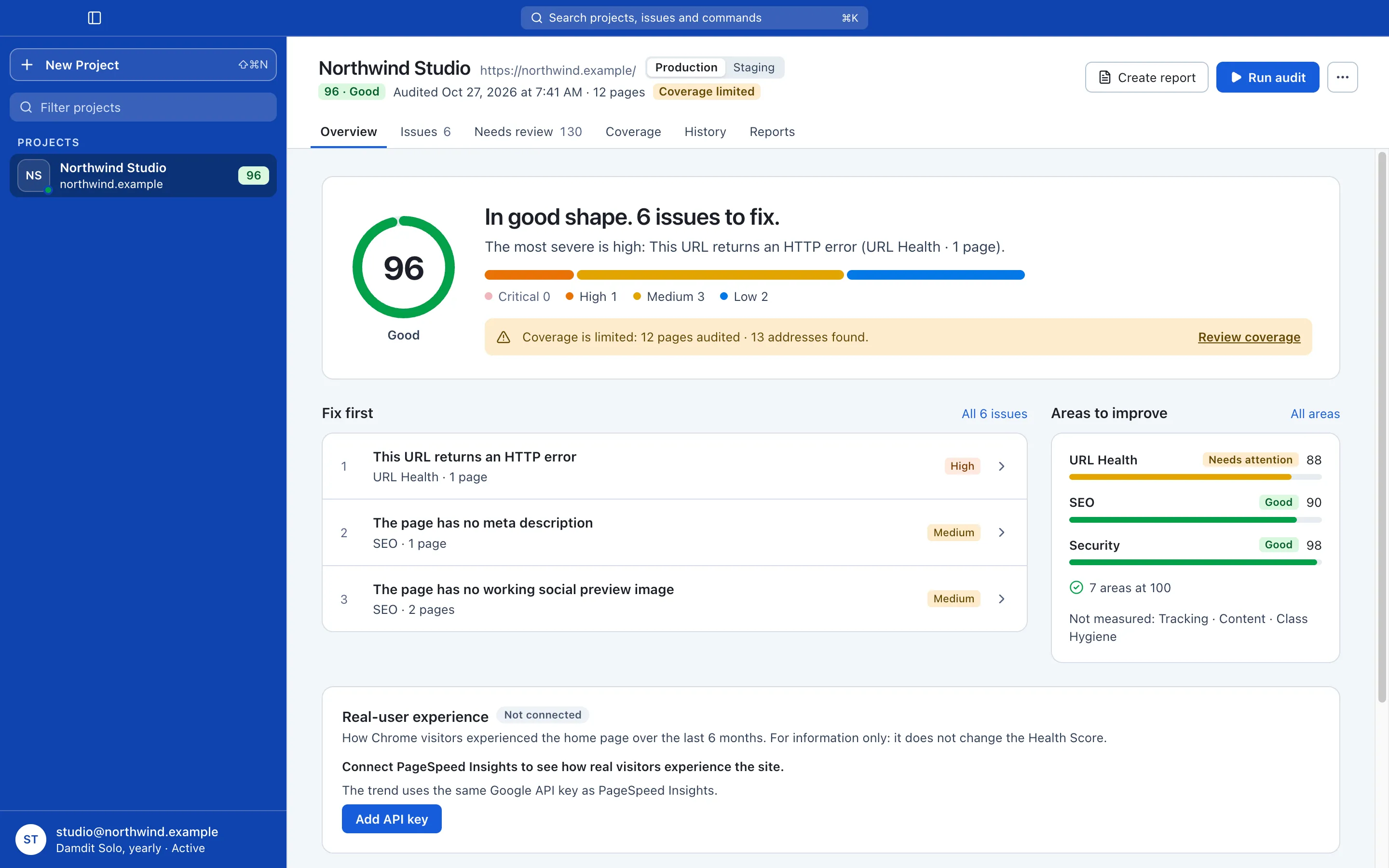
Plenty of audit tools treat a page that timed out like a page that passed. You hand over a clean report and find out later it wasn’t clean. Damdit keeps the two apart.
Pages checked out of pages planned, and which areas weren’t measured. “Speed not measured: PageSpeed is off” is part of the result.
A timeout, a website that blocks Damdit or a check that couldn’t run is reported as exactly that.
Whether some text is placeholder goes to Needs review. It doesn’t touch the score.
Coverage
Coverage limited12pages audited · 13 addresses found
Audited 12Not audited 1
MeasuredURL Health, SEO, Security and 7 more areas
Not measuredTracking · Content · Class Hygiene
Real-user experienceNot connected
Evidence
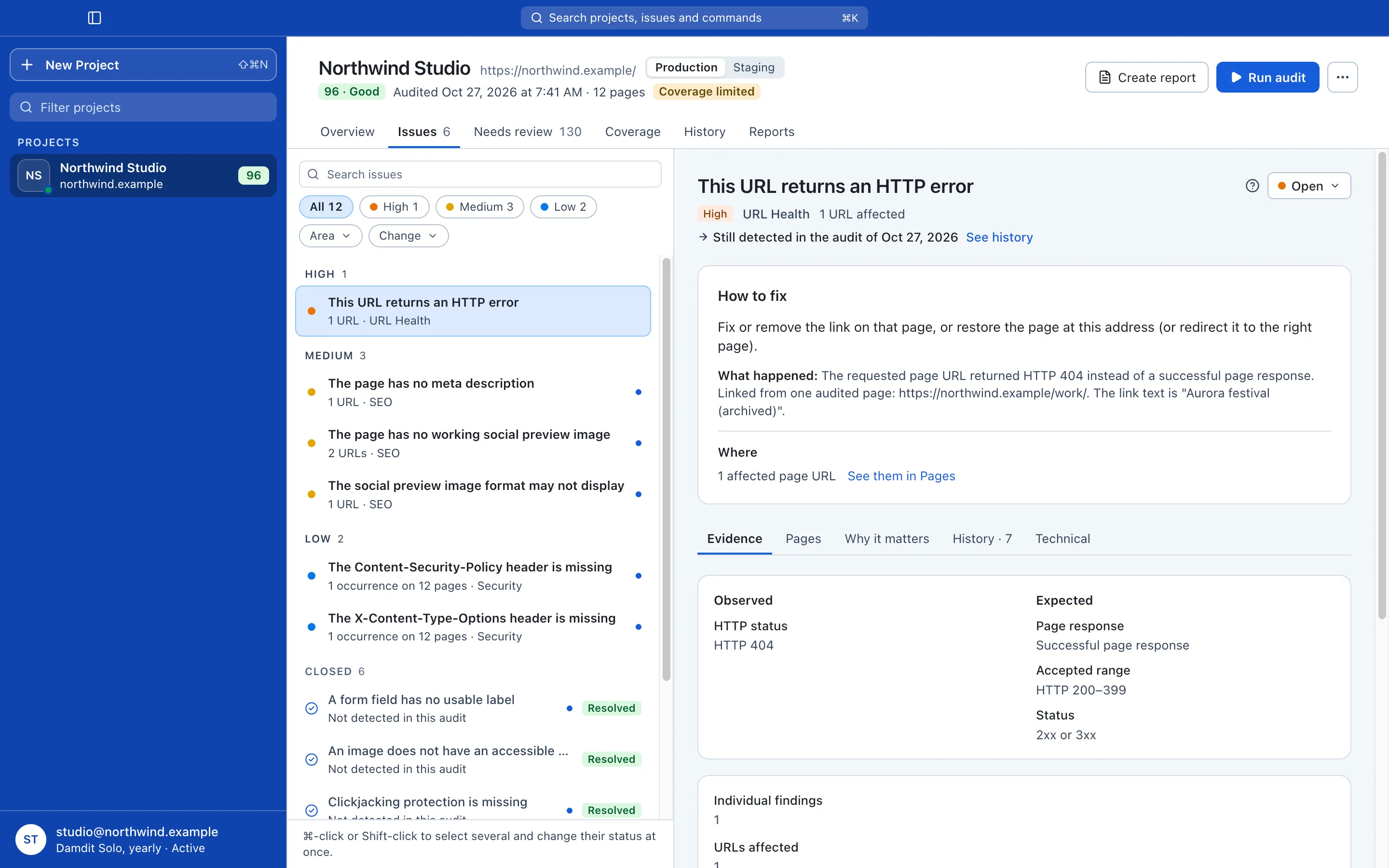
One issue per rule, with every page it affects. A label missing from a shared footer shows up as one issue on 200 pages, not 200 separate findings.
$ damdit check http://localhost:4321 --format textLocal check of http://localhost:4321 (saved nowhere)Score: 93Issues: 3 findings: 15 critical 1, high 0, medium 2, low 0Coverage: complete [critical] A form field has no usable label — 12 findings on 12 pages [medium] The page has no meta description — 1 finding on 1 page [medium] The page has no working social preview image — 2 findings on 2 pagesNot applicable here: security headers, HTTPS, robots.txt,the sitemap and PageSpeed need the live host.
Environments
Give a project up to three addresses: production, staging and your local dev server. Each keeps its own audits, history and issues, so a messy staging run never touches production’s numbers.
History
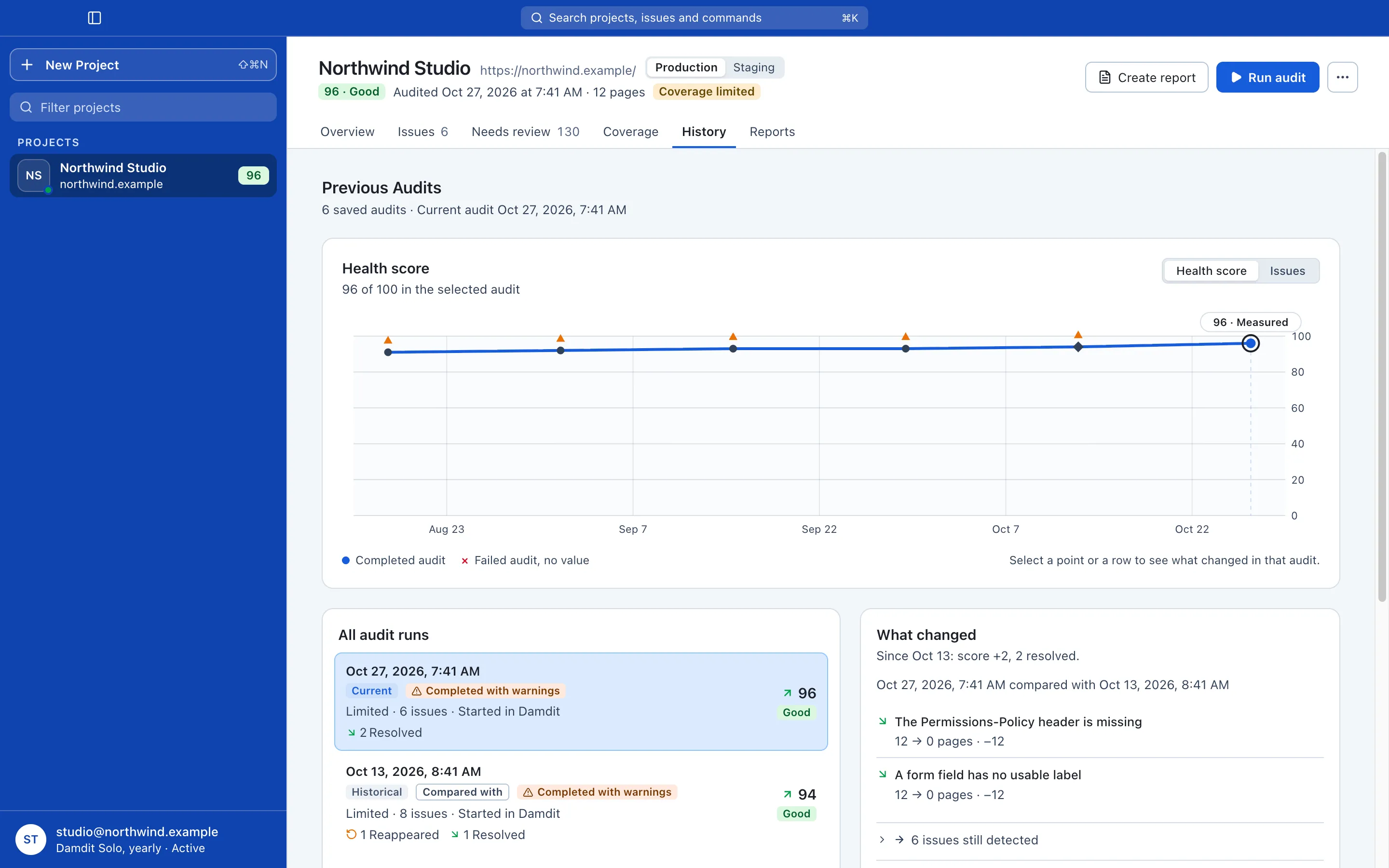
Run another audit after your changes. History shows what’s new, what’s resolved, what came back and what’s still there, audit by audit.
Or put a website on a schedule: daily, weekly or monthly. Audits run in the background with the window closed and tell you when an issue is new or comes back. Your Mac needs to be on and you need to be logged in.
For your AI tools
Claude Code, Cursor, Claude Desktop and Codex read your audits through MCP or the damdit command. Answers come from the audit, with the issue IDs behind them.
I fixed the footer contrast. Did it work?
damdit · run_audit, compare_issue_history
Yes. The new audit of Oct 13 no longer detects Text contrast is below the required minimum on any of the 12 pages. It’s Resolved. iss_7c1f
But one issue came back: A form field has no usable label, on 12 pages. The newsletter form in the footer lost its label again.
Reports
The same findings, written for whoever reads them. PDF, HTML or Markdown, and PDF and HTML carry the project’s logo.
Plain language: the score, the top priorities, what changed and what an automated audit can’t confirm.
Every issue, the affected pages, the evidence and how to fix it.
A JSON package an agent can work from.
Damdit documents the issues. You decide how to address them.
For Webflow builders
Connect a site token with read access and Damdit checks what a crawler can’t see: a published post pointing to a draft author, a reference to the wrong collection, a required field left empty. Leftover class names like div-block-47 land on the review list before handover.
Privacy first
Damdit is built to know as little about you as it can. It doesn’t track you, and it sends no diagnostics unless you say yes.
Read the Privacy PolicyProjects, website addresses, evidence, reports and access keys never go to a Damdit server. Optional modules talk to Webflow and Google directly. Your Damdit account only knows your email address, your computers and your subscription.
This website has no cookies, advertising pixels or cross-site tracking. Page views are counted by our own cookieless statistics, without storing IP addresses. Sign-in and account emails have no open or click tracking.
Damdit asks once and sends nothing until you agree. With diagnostics on, it shares a few numbers after an audit, like the score and how many issues of each severity it found. Never a website address, page content or which issues. Change your mind any time in Settings.
Audits never edit or publish your website. Damdit is built in the Czech Republic, and your account data and its backups are stored with European providers in the EU.
FAQ
Yes. Every page loads in Chromium, and the title, meta description, robots and canonical are read from the rendered page, not the raw HTML. If a page redirects on the client side after load, Damdit gives it a few seconds to settle.
Up to 500 pages, plus up to 500 link checks. Pages beyond the limit are listed in coverage as not checked.
Not yet. A site behind basic auth or a password page shows up as password-protected, and its pages aren’t checked. Your local dev server works: add it as the project’s local address.
Not yet. The damdit command runs on your Mac alongside the app, so it fits scripts and coding agents, not CI runners.
No. Damdit inspects your website and records findings. It doesn’t edit or publish anything.
No automated audit can. Damdit shows what it checked, where coverage was limited, and what couldn’t be checked. Some questions still need a manual review.
Running an audit requires access to the website and any connected services. Your saved audit history and reports remain available locally.
Yes. Export structured audit data, or let your AI tools work with Damdit directly. The app includes a command-line tool and an MCP server, so tools such as Claude Code, Codex, Cursor, or Claude Desktop can run audits and read findings on your computer. You can turn this off in Settings. Damdit doesn’t send your audit data anywhere; your AI tool’s own terms apply to what you share with it.
€12.99 a month, or €119.88 a year (€9.99 a month) when you pay yearly, excluding VAT, after a 14-day free trial. VAT for your country is added at checkout. One plan with the full app. See pricing
Know what needs fixing. Prove what changed. Free for 14 days, no card needed.
